$ python alert.py
Katseye · American Airlines Center, Dallas TX · 2026-11-11
zone Upper · get-in $298.60 · threshold $300.00
last scan 2026-09-30 23:30 UTC

alert sent to Discord
The price of a resale ticket changes many times before a concert. You do not need to check it by hand. This tutorial builds a short Python script that watches one zone of one concert with the SeatData API and its SDK. When the price falls below your threshold, the script sends a message to a Discord channel.
The script reads the get-in price of the zone. The get-in price is the lowest active listing price at the time of the last scan. It is the price of a listing and not the price of a sale. A listing can sell or change before you act, so read each message as a reason to look.
The finished script does four things on each run:
- It finds the concert and reads its listings.
- It compares the get-in price of your zone with your threshold.
- It sends one Discord message when the price is below the threshold.
- It remembers the message, so the next run does not send it again.
What you need
Assumed knowledge. You can run a Python script in a terminal and set an environment variable.
- Python 3.8 or newer.
- A SeatData API key. New accounts start with a $10 credit, and no card is needed to start. Create an account, then generate a key in the dashboard. The key is shown once, so store it when you see it.
- The SDK, version 1.2.0 or newer. The getting started guide has the setup steps in detail.
- A Discord server where you can manage webhooks. Your own server is sufficient. Step 4 creates the webhook.
$ pip install "seatdata-sdk>=1.2.0"
$ export SEATDATA_API_KEY="your-64-character-key"
$ export DISCORD_WEBHOOK_URL="https://discord.com/api/webhooks/your-id/your-token"
Every script that calls the API reads the key from the SEATDATA_API_KEY environment variable. The scripts that send a message read the DISCORD_WEBHOOK_URL variable. Keep both values out of your source files and out of version control.
Step 1Find the event
Every price call needs an event id. Search by name and month to get one. The name can be a performer or a team.
import os

from seatdata import SeatDataClient

client = SeatDataClient(api_key=os.environ["SEATDATA_API_KEY"])

events = client.search_events(
    event_name="Katseye",
    event_date="2026-11",
    historical=True,  # keeps the search working after the event date
    limit=20,
)
for event in events:
print(event["event_id"], event["event_date"], event["venue_city"], "|", event["venue_name"])1358008 2026-11-01 Hamilton | TD Coliseum (Formerly Hamilton Coliseum)
1358011 2026-11-03 Detroit | Little Caesars Arena
1358009 2026-11-05 Chicago | United Center
1358021 2026-11-07 Minneapolis | Target Center
1358015 2026-11-10 Austin | Moody Center
1358017 2026-11-11 Dallas | American Airlines Center
1358020 2026-11-14 Las Vegas | Garden Arena at MGM Grand Hotel
1358014 2026-11-17 Seattle | Climate Pledge Arena
1358022 2026-11-19 Oakland | Oakland Arena
1358023 2026-11-21 Los Angeles | Crypto.com Arena
1366929 2026-11-22 Los Angeles | Crypto.com Arena
1358013 2026-11-24 Phoenix | Mortgage Matchup Center
1358012 2026-11-27 Ciudad de México | Pabellón Oeste del Palacio de Deportes
1370778 2026-11-28 Mexico City | Palacio de los Deportes MexicoA tour plays many cities, and some cities get two nights. Check the city and the date before you copy the id. The date filter matches a part of the date, so 2026-11 finds every show in November 2026. The search reference lists every filter.
Step 2Read the listings
SeatData stores each listing of an event as a row. The listings endpoint returns every stored row of the event and the time of the last scan.
import json
import os
from datetime import datetime, timezone

from seatdata import SeatDataClient

EVENT_ID = 1358017  # the event_id from step 1
ZONE = "Upper"

client = SeatDataClient(api_key=os.environ["SEATDATA_API_KEY"])
data = client.get_listings(event_id=EVENT_ID)

rows = data["listings"]
# the response also holds the listings that the last scan did not find
active = [row for row in rows if row["active"] == 1]
scanned = datetime.fromtimestamp(data["last_refresh_timestamp"], timezone.utc)
print("last scan", scanned.strftime("%Y-%m-%d %H:%M UTC"))
print(f"{len(rows):,} rows, {len(active):,} active")
print("zones:", ", ".join(sorted({row["zone"] for row in active if row["zone"]})))

# the cheapest active listing of the zone sets its get-in price
in_zone = [row for row in active if row["zone"] == ZONE and row["price"] > 0]
print(json.dumps(min(in_zone, key=lambda row: row["price"]), indent=2))last scan 2026-09-30 23:30 UTC
25,575 rows, 788 active
zones: Admiral Suite, Flagship Suite, Floor, Lower, Middle, Platinum Suite, Upper
{
  "listing_id": 14054659248,
  "active": 1,
  "zone": "Upper",
  "section": "320",
  "row": "K",
  "quantity_start": 1,
  "quantity": 1,
  "price": 298.6
}The script prints the time of the last scan in UTC, the number of rows, the zone names, and the cheapest active listing of the zone Upper. Most rows of a busy event are old, so each script of this tutorial selects the rows with active set to 1.
The response holds two more keys. last_refresh_timestamp is the time of the last scan in Unix seconds, or null. has_refreshed is 1 when the call cost a pull.
Read a listing record
Each row describes one listing in eight fields. The alert reads three of them: active, zone, and price.
{
"listing_id": 14054659248,
"active": 1,
"zone": "Upper",
"section": "320",
"row": "K",
"quantity_start": 1,
"quantity": 1,
"price": 298.6
}- listing_idinteger
- The id of the listing.
- activeinteger
- 1 when the last scan found the listing. 0 when it did not.
- zonestring
- The zone of the seats. The script matches the name exactly. The field is empty when the listing has no zone.
- sectionstring
- The section of the seats.
- rowstring
- The row of the seats.
- quantity_startinteger or null
- The number of tickets when SeatData first saw the listing.
- quantityinteger or null
- The number of tickets when SeatData last saw the listing.
- pricenumber
- The price per ticket when SeatData last saw the listing. Fees can come on top. Prices are in US dollars.
The lowest listing of a zone can be a single ticket. If you need 2 or more tickets from one listing, set MIN_QUANTITY = 2 in the full script.
Step 3Check one zone
Select the zone that you want to watch, and set a threshold. The threshold is the listing price below which you want a message. The script computes the get-in price of each zone, which is the lowest price among its active listings.
import os
import sys

from seatdata import SeatDataClient

EVENT_ID = 1358017
ZONE = "Upper"
THRESHOLD = 300.00  # US dollars


def money(value):
    return f"${value:,.2f}"


client = SeatDataClient(api_key=os.environ["SEATDATA_API_KEY"])
rows = client.get_listings(event_id=EVENT_ID)["listings"]

# the get-in price of a zone is the lowest price among its active listings
zones = {}
for row in rows:
    if row["active"] == 1 and row["price"] > 0 and row["zone"]:
        zones[row["zone"]] = min(row["price"], zones.get(row["zone"], row["price"]))
if ZONE not in zones:
    sys.exit(f"Zone '{ZONE}' has no active listing. Zones: {', '.join(sorted(zones))}")

for name, price in sorted(zones.items(), key=lambda item: item[1]):
    mark = "  <- the zone to watch" if name == ZONE else ""
    print(f"{name:<16}{money(price):>10}{mark}")

verdict = "below" if zones[ZONE] < THRESHOLD else "not below"
print()
print(f"{ZONE}: {money(zones[ZONE])} is {verdict} the threshold of {money(THRESHOLD)}")Upper $298.60 <- the zone to watch
Middle $342.83
Flagship Suite $436.28
Lower $437.62
Platinum Suite $479.91
Floor $519.14
Admiral Suite $1,664.16
Upper: $298.60 is below the threshold of $300.00The list shows every zone, from the lowest get-in price to the highest. Set a threshold that the price can reach.
A zone name with a typing error does not fail silently. The script stops and prints the zones that have active listings, so you can copy the correct name.
Step 4Send a Discord message
A webhook is a URL that accepts messages for one channel. It needs no Discord application and no login. Create one in Discord:
- Open Server Settings, and select Integrations.
- Select Create Webhook.
- Give the webhook a name, and select the channel for the messages.
- Select Copy Webhook URL, and store the URL in the
DISCORD_WEBHOOK_URLenvironment variable.
You need the permission to manage webhooks on the server. The Discord guide to webhooks shows each step.
The standard library of Python sends the message. The request is a POST with a small JSON body.
import json
import os
import urllib.request

# The URL is a secret. Anyone who has it can post to the channel.
WEBHOOK_URL = os.environ["DISCORD_WEBHOOK_URL"]

request = urllib.request.Request(
    WEBHOOK_URL,
    data=json.dumps({"content": "Test message from the price alert script."}).encode("utf-8"),
    # Discord rejects the default User-Agent of urllib
    headers={"Content-Type": "application/json", "User-Agent": "price-alert/1.0"},
    method="POST",
)
with urllib.request.urlopen(request, timeout=10) as response:
print("Discord answered with status", response.status)Discord answered with status 204Status 204 means that Discord accepted the message and sends no content back. Do not remove the User-Agent header. Discord rejects a request that carries the default header of urllib, and the answer is then status 403.
Step 5Alert once
A script that runs every 5 minutes must not send the same news on each run. The full script keeps a small state file, alert_state.json, and follows one rule with three parts:
- Armed. When the price is below the threshold, the script sends one message. After that, it is not armed.
- Not armed. The script sends nothing, also when the price falls further.
- Armed again. When the price rises to the threshold plus 2%, the script is armed again. The next price below the threshold sends a new message.
The margin of 2% has a reason. The get-in price of a zone can move by small amounts from one scan to the next. Without a margin, a price that sits at the threshold crosses it again and again, and each fall sends a message. The constant REARM_MARGIN sets the margin.
This is the channel after the capture: the test message of step 4, and below it the alert of the first run.
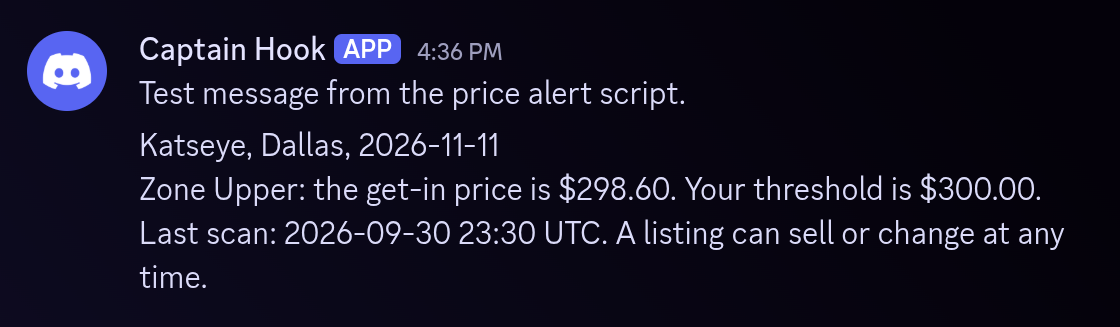
The second run came a moment later. It found the same price and sent nothing:
$ python alert.py
Katseye · American Airlines Center, Dallas TX · 2026-11-11
zone Upper · get-in $298.60 · threshold $300.00
last scan 2026-09-30 23:30 UTC

no message: an alert is already out. The script arms again at $306.00.
The script saves the state only after Discord accepted the message. When the send fails, the state does not change, and the next run tries again. When you change the event, the zone, MIN_QUANTITY, or the threshold, the script starts armed.
Step 6Schedule it
Schedule the script every 5 minutes with cron. Put both secrets in a file that only your user can read, and load that file in the cron line.
# alert.env holds two lines:
#   export SEATDATA_API_KEY="your-64-character-key"
#   export DISCORD_WEBHOOK_URL="https://discord.com/api/webhooks/your-id/your-token"
# chmod 600 alert.env
# Cron does not use your shell setup. Replace /usr/bin/python3 with the output of:
#   python3 -c "import sys; print(sys.executable)"
*/5 * * * * cd /home/you/alert && . ./alert.env && /usr/bin/python3 alert.py >> alert.log 2>&1
The cron line changes to the directory of the script first, because the state file is in the working directory. Each run adds its output to alert.log.
An error gives one line in the log, and the script ends with exit code 1. The script prints no traceback, and it never prints the key or the webhook URL. After the concert, the script prints that the event is over and sends nothing. Remove the cron line then.
What a run costs
One run of the script makes two API calls, and one call to Discord at most.
| Call | SDK method | Cost |
|---|---|---|
| Search | search_events | Free |
| Listings | get_listings | 1 pull for the first call, then 1 pull per new scan. |
The first call for an event costs a pull. After that, a run costs a pull only when SeatData scanned the event again since your last paid pull. The other runs are free. So the schedule sets the most that the script can spend: a run every 5 minutes makes at most 288 pulls per day. The number of scans sets the real count. The price of a pull depends on your plan. See API pricing for the current rates.
Full script
The complete alert in one file. To watch a different concert, change the constants at the top. The last lines of the file catch each error that the script does not expect, so that cron logs one line.
"""Send a Discord message when the get-in price of one zone falls below a threshold.

Usage:
    export SEATDATA_API_KEY="your-64-character-key"
    export DISCORD_WEBHOOK_URL="https://discord.com/api/webhooks/your-id/your-token"
    python alert.py
"""
import json
import os
import sys
import urllib.error
import urllib.request
from datetime import date, datetime, timezone

try:
    from seatdata import SeatDataClient, SeatDataError
except ImportError:
    sys.exit('The SDK is missing. Run: pip install "seatdata-sdk>=1.2.0"')

PERFORMER = "Katseye"
CITY = "Dallas"
EVENT_DATE = "2026-11-11"  # the tour has many dates, and the date selects one
ZONE = "Upper"
MIN_QUANTITY = 1  # 2 watches only the listings with 2 or more tickets
THRESHOLD = 300.00  # US dollars
REARM_MARGIN = 0.02  # after an alert, the price must reach the threshold plus 2%
STATE_PATH = "alert_state.json"  # in the working directory


def find_event(client):
    # historical=True keeps the search working after the event date
    events = client.search_events(
        event_name=PERFORMER, venue_city=CITY, event_date=EVENT_DATE, historical=True, limit=1
    )
    if not events:
        sys.exit("No event found. Check PERFORMER, CITY, and EVENT_DATE.")
    return events[0]


def zone_price(listings):
    """Return the get-in price of ZONE: the lowest price among its active listings."""
    prices = {}
    for listing in listings:
        # the response also holds the listings that the last scan did not find
        if listing["active"] != 1 or listing["price"] <= 0:
            continue
        # quantity can be null, so MIN_QUANTITY = 1 does not read it
        if MIN_QUANTITY > 1 and (listing["quantity"] or 0) < MIN_QUANTITY:
            continue
        prices.setdefault(listing["zone"], []).append(listing["price"])
    if ZONE not in prices:
        zones = ", ".join(sorted(zone for zone in prices if zone)) or "none"
        sys.exit(f"Zone '{ZONE}' has no active listing. Zones with active listings: {zones}")
    return min(prices[ZONE])


def scan_time(timestamp):
    """Format the Unix time of the last scan in UTC."""
    if timestamp is None:
        return "unknown"
    return datetime.fromtimestamp(timestamp, timezone.utc).strftime("%Y-%m-%d %H:%M UTC")


def rearm_price(threshold, margin):
    return round(threshold * (1 + margin), 2)


def decide(armed, price, threshold, margin):
    """Return (send, armed) for one price reading.

    An armed script sends a message when the price is below the threshold. Then it waits.
    It arms again when the price reaches the threshold plus the margin.
    """
    if armed:
        send = price < threshold
        return send, not send
    return False, price >= rearm_price(threshold, margin)


def load_armed(event_id):
    """Return True when the script is armed. A missing file means armed."""
    try:
        with open(STATE_PATH) as handle:
            state = json.load(handle)
        # a state for another event, zone, quantity, or threshold does not count
        watch = (state["event_id"], state["zone"], state["min_quantity"], state["threshold"])
        if watch != (event_id, ZONE, MIN_QUANTITY, THRESHOLD):
            return True
        return bool(state["armed"])
    except FileNotFoundError:
        return True
    except (OSError, ValueError, KeyError, TypeError):
        sys.exit(f"State file error: cannot read {STATE_PATH}. Delete the file to start again.")


def save_state(event_id, armed, price, scanned):
    state = {
        "event_id": event_id, "zone": ZONE, "min_quantity": MIN_QUANTITY, "threshold": THRESHOLD,
        "armed": armed, "price": price, "scanned": scanned,
    }
    with open(STATE_PATH, "w") as handle:
        json.dump(state, handle, indent=2)


def send_discord(webhook_url, text):
    """Post one message to the Discord webhook."""
    request = urllib.request.Request(
        webhook_url,
        data=json.dumps({"content": text}).encode("utf-8"),
        # Discord rejects the default User-Agent of urllib
        headers={"Content-Type": "application/json", "User-Agent": "price-alert/1.0"},
        method="POST",
    )
    try:
        with urllib.request.urlopen(request, timeout=10):
            pass
    except urllib.error.HTTPError as error:
        sys.exit(f"Discord error: HTTP {error.code}")
    except OSError:
        sys.exit("Discord error: no connection")


def money(value):
    return f"${value:,.2f}"


def main():
    api_key = os.environ.get("SEATDATA_API_KEY", "").strip()
    webhook_url = os.environ.get("DISCORD_WEBHOOK_URL", "").strip()
    if not api_key:
        sys.exit("Set the SEATDATA_API_KEY environment variable first.")
    if not webhook_url:
        sys.exit("Set the DISCORD_WEBHOOK_URL environment variable first.")
    if not webhook_url.startswith("https://"):
        sys.exit("DISCORD_WEBHOOK_URL must start with https://")

    try:
        # one call returns every stored listing of the event, so allow 60 seconds
        client = SeatDataClient(api_key=api_key, timeout=60)
        event = find_event(client)
        if date.fromisoformat(event["event_date"]) < date.today():
            print(f'The event took place on {event["event_date"]}. Nothing to watch.')
            return
        # read the state before the listings call, so a damaged file costs no pull
        armed = load_armed(event["event_id"])
        data = client.get_listings(event_id=event["event_id"])
    except (SeatDataError, ValueError) as error:
        sys.exit(f"SeatData error: {error}")
    if "last_refresh_timestamp" not in data:
        sys.exit('Update the SDK. Run: pip install -U "seatdata-sdk>=1.2.0"')
    if not data["listings"]:
        sys.exit("No listings for this event yet.")
    price = zone_price(data["listings"])
    send, armed_now = decide(armed, price, THRESHOLD, REARM_MARGIN)

    seen = scan_time(data["last_refresh_timestamp"])
    if send:
        send_discord(webhook_url, (
            f'{event["event_name"]}, {event["venue_city"]}, {event["event_date"]}\n'
            f"Zone {ZONE}: the get-in price is {money(price)}. "
            f"Your threshold is {money(THRESHOLD)}.\n"
            f"Last scan: {seen}. A listing can sell or change at any time."
        ))
    if armed_now != armed:
        # the state changes only after Discord accepted the message
        try:
            save_state(event["event_id"], armed_now, price, data["last_refresh_timestamp"])
        except OSError:
            sys.exit(f"State file error: cannot write {STATE_PATH}. The next run repeats this step.")

    venue = f'{event["venue_name"]}, {event["venue_city"]} {event["venue_state"]}'
    rearm = money(rearm_price(THRESHOLD, REARM_MARGIN))
    print(f'{event["event_name"]} · {venue} · {event["event_date"]}')
    print(f"zone {ZONE} · get-in {money(price)} · threshold {money(THRESHOLD)}")
    print(f"last scan {seen}")
    print()
    if send:
        print("alert sent to Discord")
    elif armed_now and not armed:
        print(f"armed again: the price reached {rearm} or more")
    elif armed_now:
        print("no alert: the price is not below the threshold")
    else:
        print(f"no message: an alert is already out. The script arms again at {rearm}.")


if __name__ == "__main__":
    try:
        main()
    except Exception as error:  # cron logs one line, never a traceback
        sys.exit(f"Unexpected error: {type(error).__name__}")
Troubleshooting
The full script reports each SDK error as one line that starts with SeatData error. The step scripts show the error class.
- ValueErroron start
- The key is not 64 characters long. Copy it again from the dashboard.
- SeatDataAuthErrorHTTP 401
- The key is wrong or was revoked. Generate a new key.
- SeatDataPaymentErrorHTTP 402
- The balance does not cover the pull. Add funds or choose a plan.
- SeatDataRateLimitErrorHTTP 429
- Too many requests. The error carries
retry_after, the number of seconds to wait. - The SDK is missingscript message
- Python cannot import the SDK. Run the
pip installline of "What you need" in the environment that runs the script. - Update the SDKscript message
- The SDK is older than 1.2.0, and its listings call returns no scan time. Run the
pip installline of the message. - No event foundscript message
- The search matched nothing. Check the spelling of
PERFORMERandCITY, and the date inEVENT_DATE. - Zone 'Upper' has no active listingscript message
- The name has a typing error, or the zone had nothing on sale at the last scan. Compare the name with the list in the message.
- Discord error: HTTP 404script message
- Discord does not know the webhook. Copy the URL again, or create a new webhook.
- State file errorscript message
- The script cannot read or write
alert_state.json. After a read error, delete the file, and the script starts armed. After a write error, check that your user can write to the directory.
Next steps
The alert watches one zone of one concert. The price history of the same event shows whether a fall is unusual. The first tutorial of this series builds a tracker for the price history of one event.
- TutorialTrack the price historyBuild a price tracker for one event.
- GET /v0.1.1/listings/getWatch more zonesOne call holds every zone of the event.
- Ticket Data APISee every endpointSales, price history, listings, and search.